Free
€0 forever
Everything for 14 days. Then RiskTrader stays free on demo, live capped at 0.03 lot.
Full IQ for 14 days- Dashboard
- Lite
- Keypad
- No
- Live lot cap
- 0.03 on live
One system. One login. Every stage of your trading day.
One account ties it together. What you execute in the terminal lands in your journal by itself.
On your desk, on your charts, in your journal.
One system. One login. Every stage of your trading day.
One account ties it together. What you execute in the terminal lands in your journal by itself.
On your desk, on your charts, in your journal.
Riskeys locks your risk in before you click buy, and logs every trade the second you close it. No resizing under pressure. No forgotten review. Just the plan you already have, enforced automatically inside MetaTrader.



Every plan runs the same toolkit on MT4 and MT5. What changes is how long your runway is, and whether the keypad ships with it.
No card. Everything for 14 days, then RiskTrader stays free on demo.
€0 forever
Everything for 14 days. Then RiskTrader stays free on demo, live capped at 0.03 lot.
Full IQ for 14 daysOne payment, and the licence is yours for good. Lifts the 0.03 lot cap on live accounts. The dashboard stays lite.
From€33 one payment
RiskTrader on your platform, live accounts. No lot cap.
Lite IQ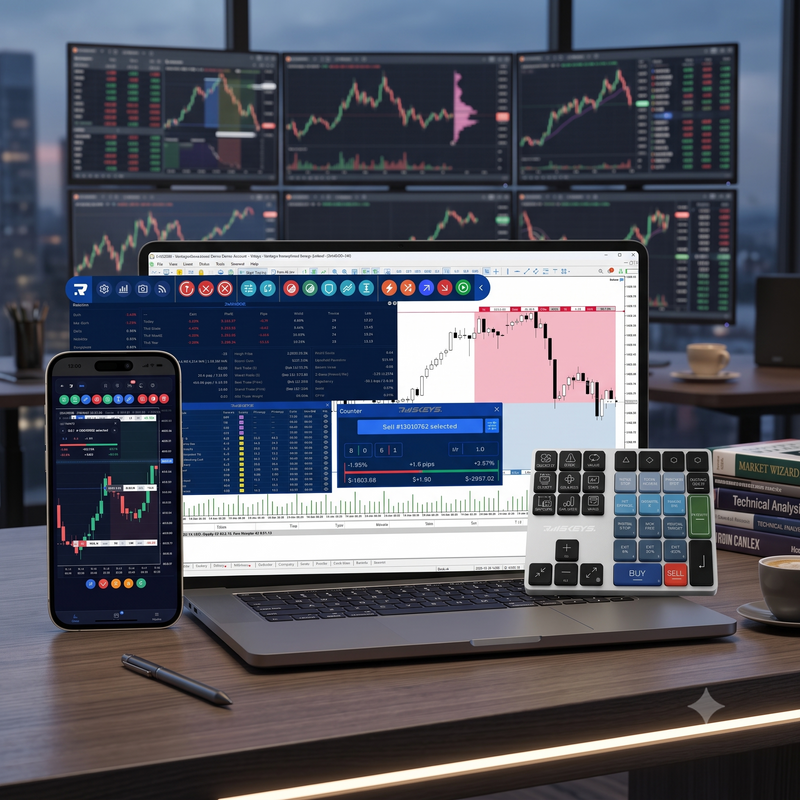
From€127 one payment
The physical keypad, plus RiskTrader on your charts. No subscription.
Lite IQThe full dashboard, signals and no lot cap. Core and Elite ship the keypad; Digital Monthly ships without it.
€39 every month, cancel anytime
The full Riskeys IQ without a term. MT4 and MT5 both included, plus the Signal Receiver.
Full IQ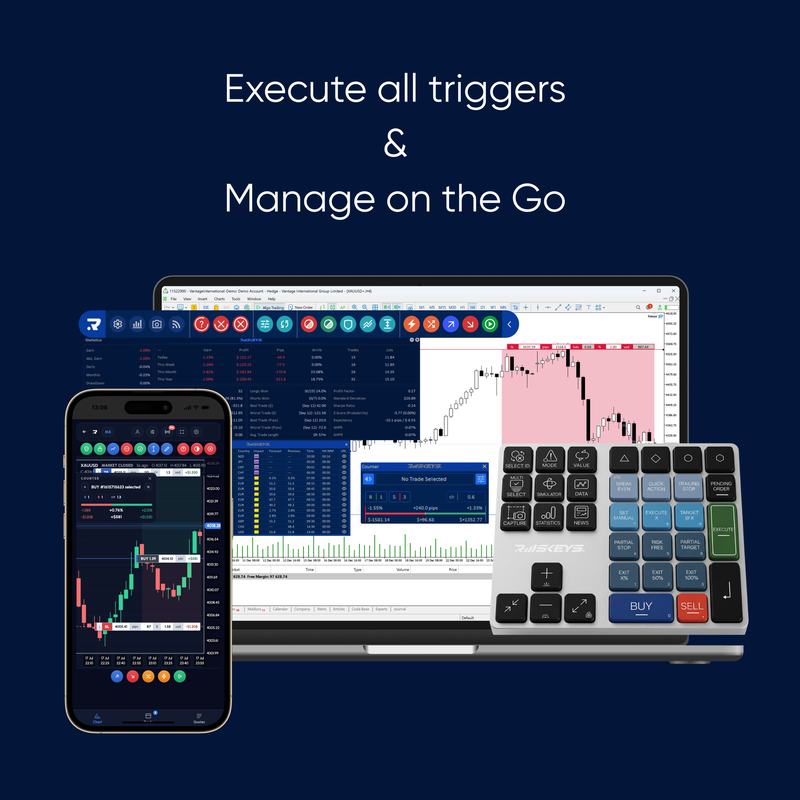
From €197 every 6 months, or €297 every 12
Full IQ, simulator, backtesting and AI insights. Signal Receiver on MT5. Pick the term that suits you.
Full IQ + keypadYour position size is already calculated and capped to your risk rule, so a confident mood can't inflate it and a scared one can't shrink it.
PropFirmGuard and on-chart controls keep the position inside your drawdown rule in real time, so managing it stops being a judgment call under pressure.
The trade lands in your Riskeys IQ automatically. Nothing to log, nothing to forget, so the review happens even on the days you don't feel like doing it.
Seven behavioral detectors show you which pattern is actually costing you: revenge trades, oversized sessions, bad-session spirals, so you fix the real leak instead of guessing.
Magic Keys handles the click. TradeZella handles the memory. Neither one is watching you at the moment your rule breaks.
Riskeys is built into that exact moment: before the trade, during it, and after it closes, inside MetaTrader.
See it enforce a real trade
"I knew the trade was wrong, but I held it anyway."
Emotional override detected
Most traders can already spot a good setup. What breaks the account is what happens after: size creeps up on the confident days, stops move on the scared ones, and the same mistake repeats because nobody reviewed the last one. The setup was never the leak.
Lot size creeps up when you're confident and collapses when you're scared. Riskeys calculates it and locks it before you can override it, so your worst day sizes the same as your best one.
Most traders never find out why they lose, so the mistake shows up again next month. Riskeys flags the pattern the same week it happens, so you fix the leak instead of repeating it.
SEE IT IN ACTION
Explore every key function on chart. Click through the deck to see how execution, risk management, and journaling work together inside MetaTrader.
TradeZella starts after you close. Riskeys starts before you open, and stays with you all the way to the review.
Set your risk percentage, pick a preset, and let the toolkit calculate your lot size automatically. PropFirmGuard locks your drawdown limit before you touch the market.
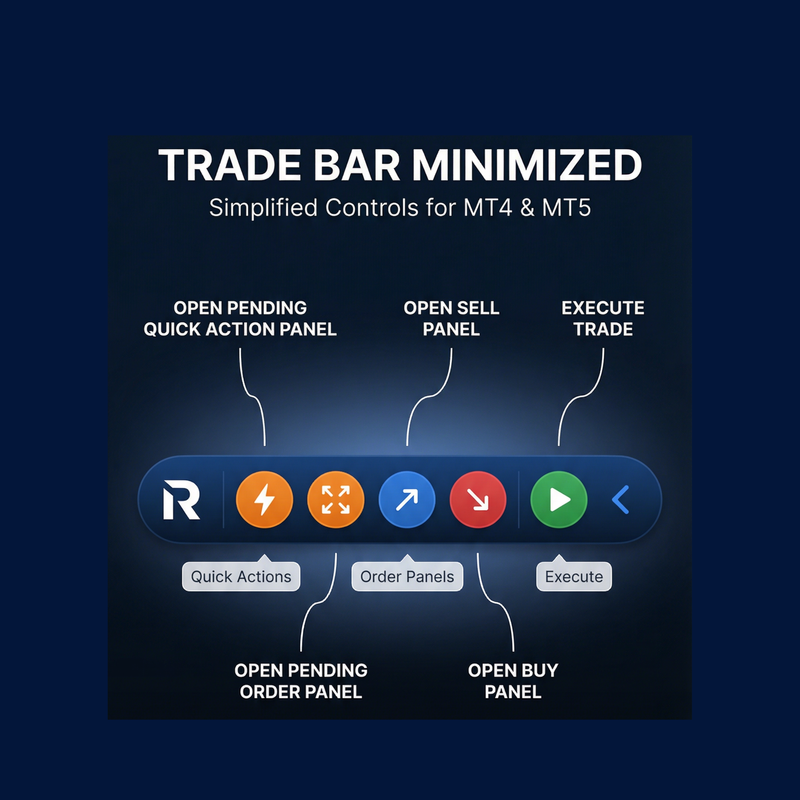
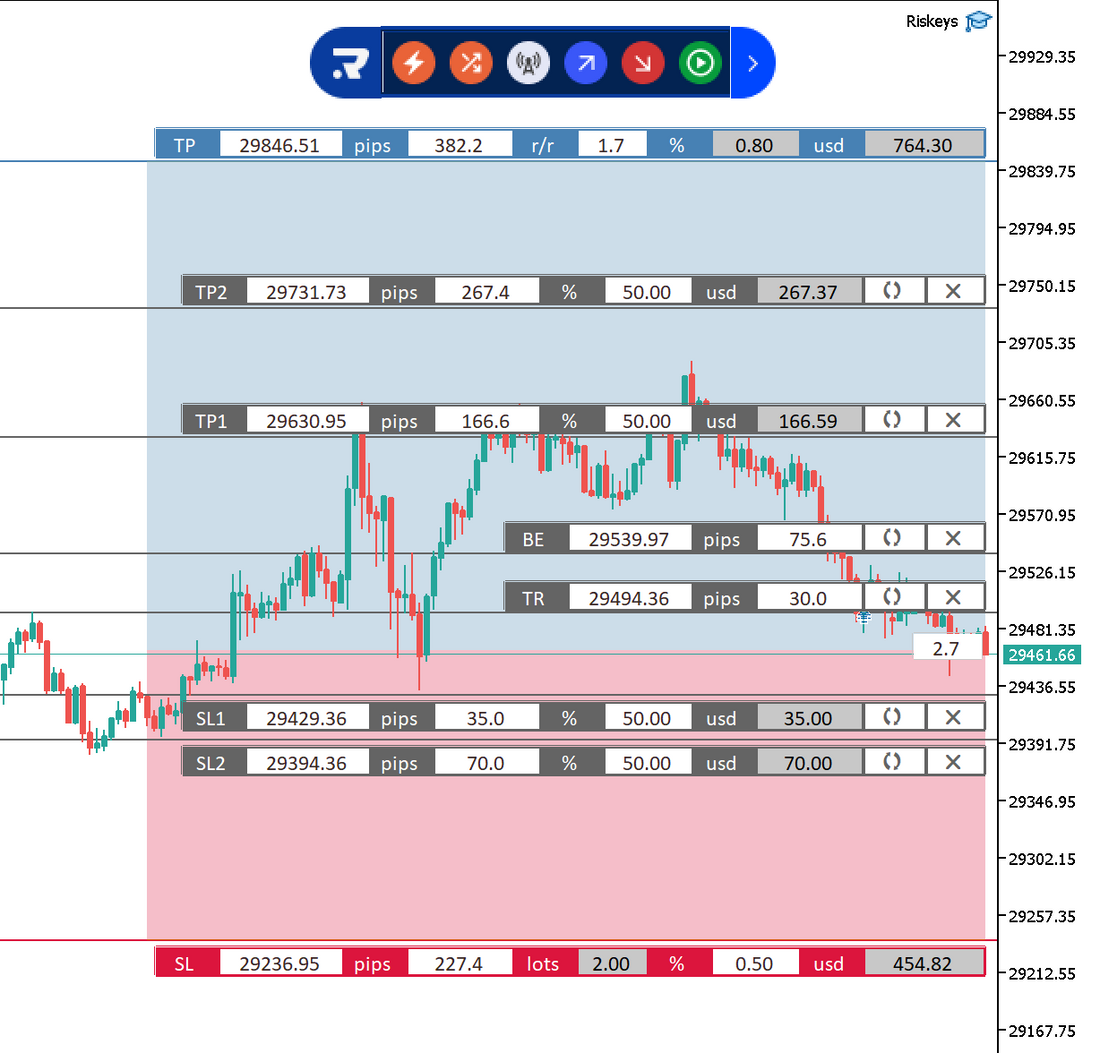
Buy, sell, move stop-loss, trigger break-even or partial close, all from the floating pill bar directly on your MetaTrader chart. No switching windows.
The moment a trade closes in MetaTrader, it syncs automatically to your Riskeys IQ. No CSV, no copy-paste, no manual entry. It just appears.
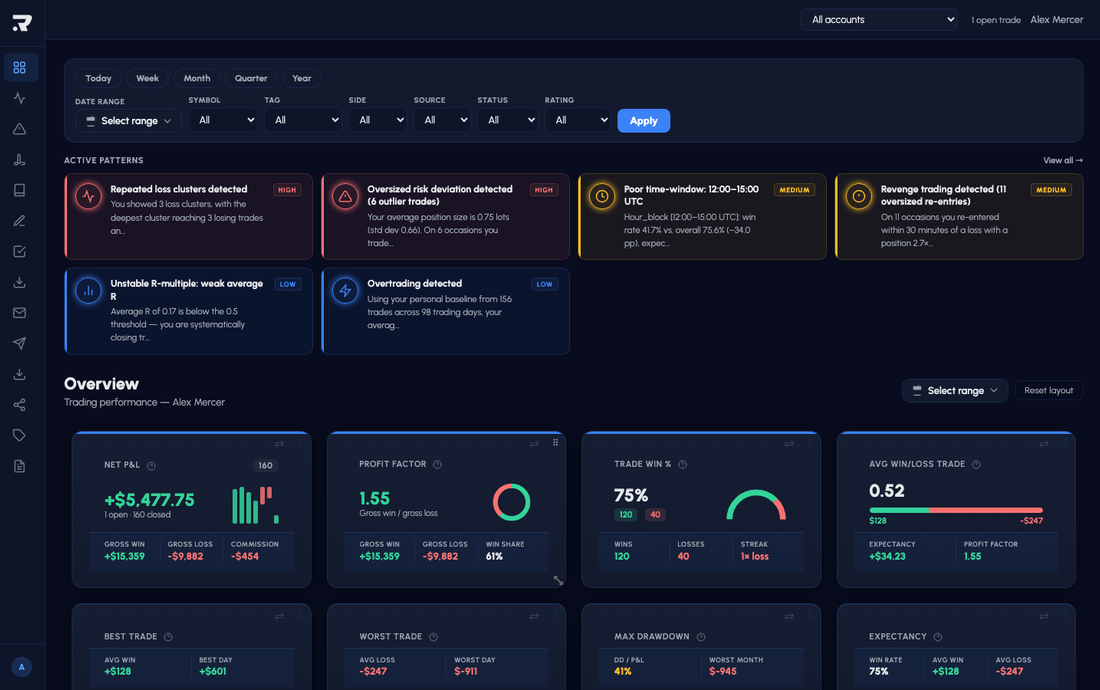
Seven behavioral detectors scan your trade history automatically. See your equity curve, calendar heatmap, session breakdown and journal, then understand why you win and why you lose.
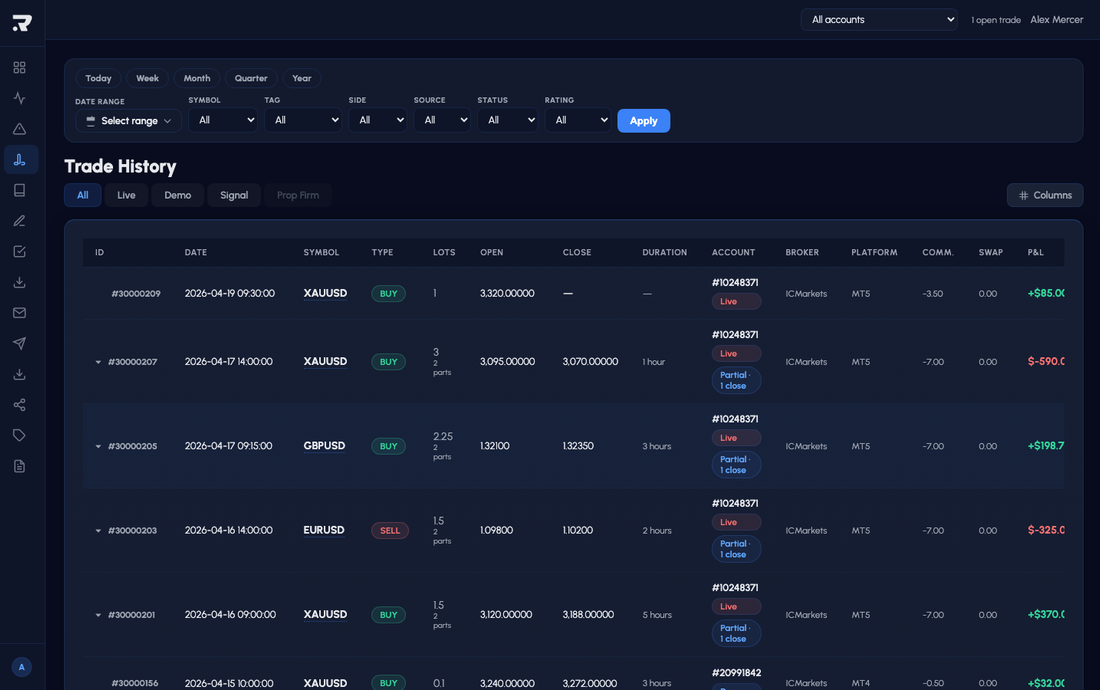
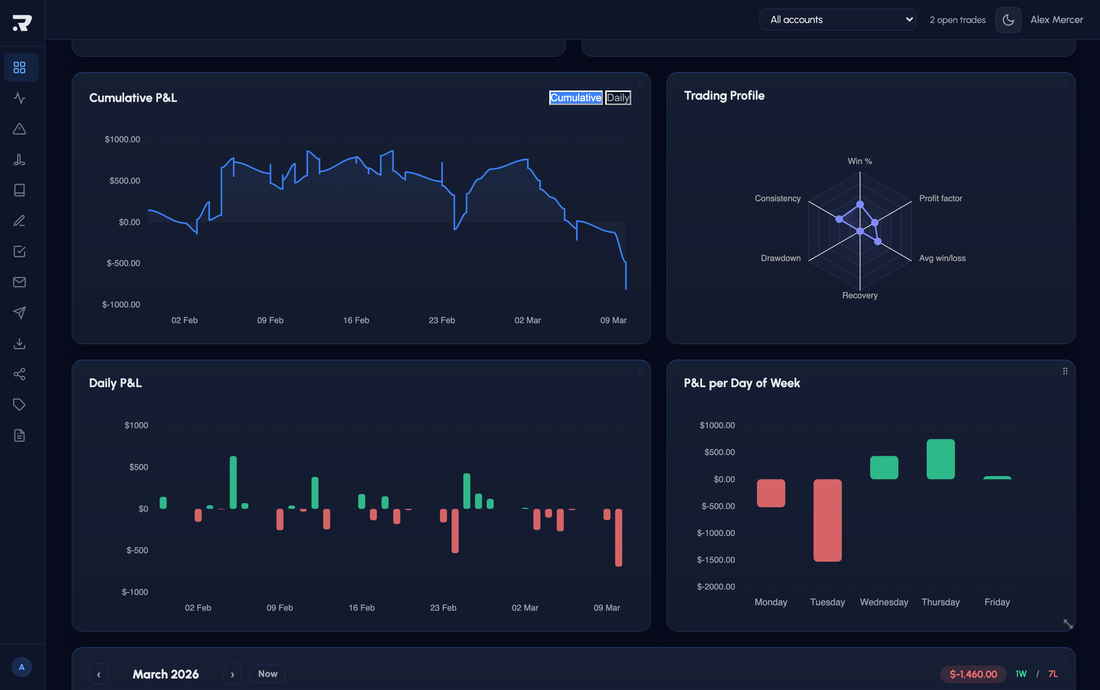
Set your risk before the trade. Execute from the chart. Manage the position in real time. Review in Riskeys IQ. Identify the pattern. Riskeys handles all of it.
Set your risk percentage, choose a preset, and let the toolkit calculate lot size automatically before you touch the market.
Buy, sell, trailing stop, break-even and partial close, all from a floating pill bar directly on your chart.
Every trade syncs automatically. Riskeys IQ detects overtrading, revenge trading, loss clusters and 4 more patterns.
Every trade syncs from MetaTrader automatically. Here are a few of the panels you will live in.
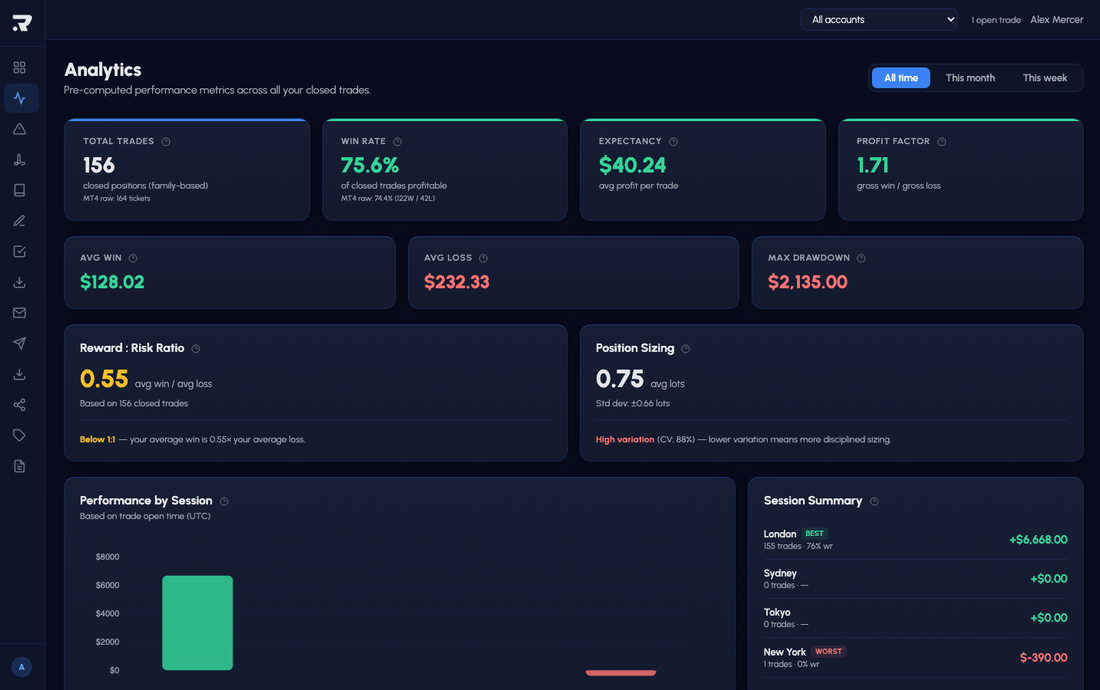
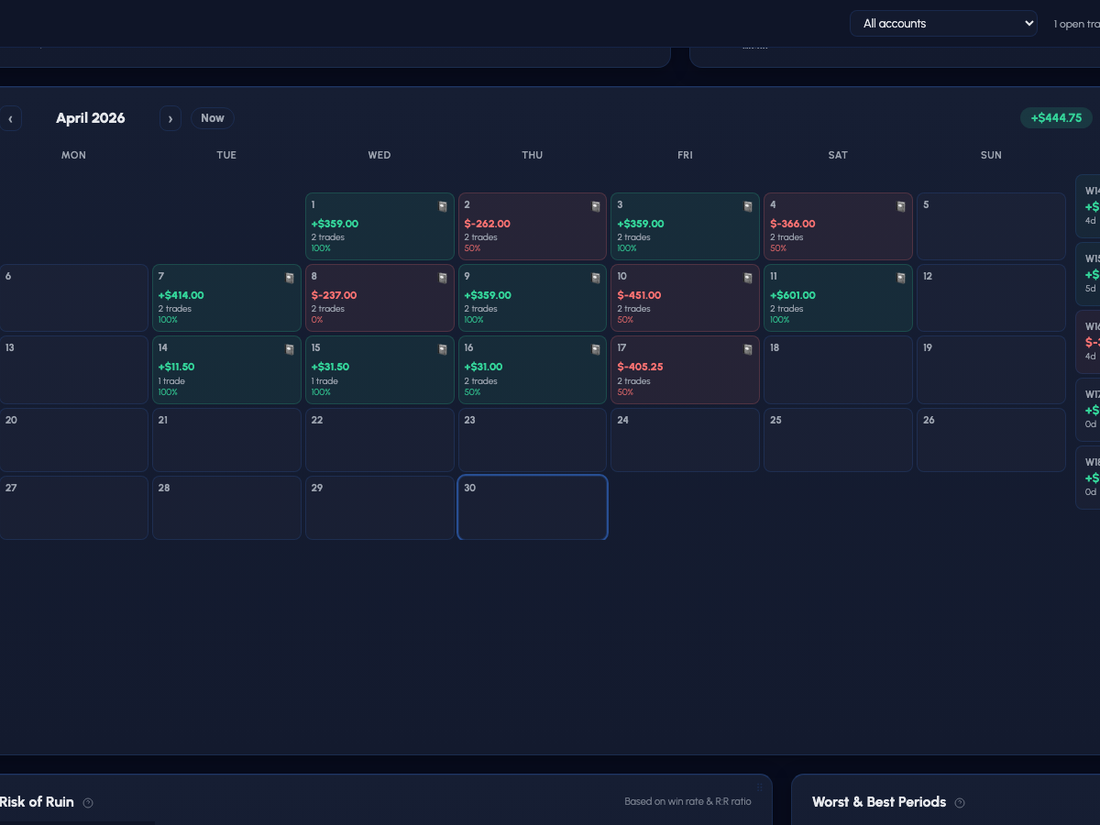
If your broker supports MT4 or MT5, Riskeys connects automatically. No API keys, no CSV uploads, no setup headaches.
Platform names, broker names and trademarks belong to their respective owners. Compatibility does not imply endorsement, partnership or affiliation. Features can vary by platform version, broker, operating system, account configuration and Riskeys plan.
Riskeys covers execution, risk management, journaling, analytics and signal receiving. Five disciplines, one system. Your trades flow automatically from MetaTrader into Riskeys IQ, cloud-based analytics you reach from any browser. No CSV, no copy-paste.
Enter trades instantly with pre-calculated lot size and risk. No dialogs, no delays.
Set your risk % once. Every trade gets the exact lot size for your account balance automatically.
Move stop loss to entry price in one click. Lock profit with zero manual calculation.
Automated profit protection that follows price action. Configurable distance and step.
Take profits in pre-defined increments (25%, 50%, 75%) without leaving the chart.
Practice your strategy with full toolkit functionality in the MT5 simulator.
Profit Factor, Win Rate, Sharpe Ratio, Z-Score, AHPR, GHPR, Best/Worst trade, all in one place.
Daily P&L heatmap with win rate per day, weekly totals, and month-by-month navigation.
Overtrading, Revenge Trading, Risk Deviation, Poor Time Window, Loss Cluster, Inconsistent R-Multiple, Discipline Drift.
Every position auto-synced from MT4/MT5. Partial closes grouped with full lot breakdown per close.
Zero-latency connection between your MetaTrader terminal and your cloud-based analytics. No CSV exports.
Swap and commission recorded per trade so your real P&L is always accurate, not just gross profit.
Risk-adjusted performance per trade: R-multiple plus maximum adverse and favorable excursion.
Every trade gets an execution-quality score, so you can compare discipline across trades at a glance.
Click any trade for the full picture: price chart with entry and exit markers, journal data and metrics in one view.
Tag every trade with a custom strategy: Breakout, Trend Follow, Scalp, or any label you define.
Attach your marked-up chart to any trade entry. Review your reasoning alongside your result.
Rate your mental state on every trade: Revenge, Neutral, Focused. Filter and spot the pattern.
Isolate any tag and see its win rate, average P&L, and R-multiple. Know which setups actually perform.
Add freeform notes to any trade entry. Your reasoning, your emotions, your plan, all in one place.
See aggregated stats per strategy tag: total trades, win rate, average R, net P&L, ranked by performance.
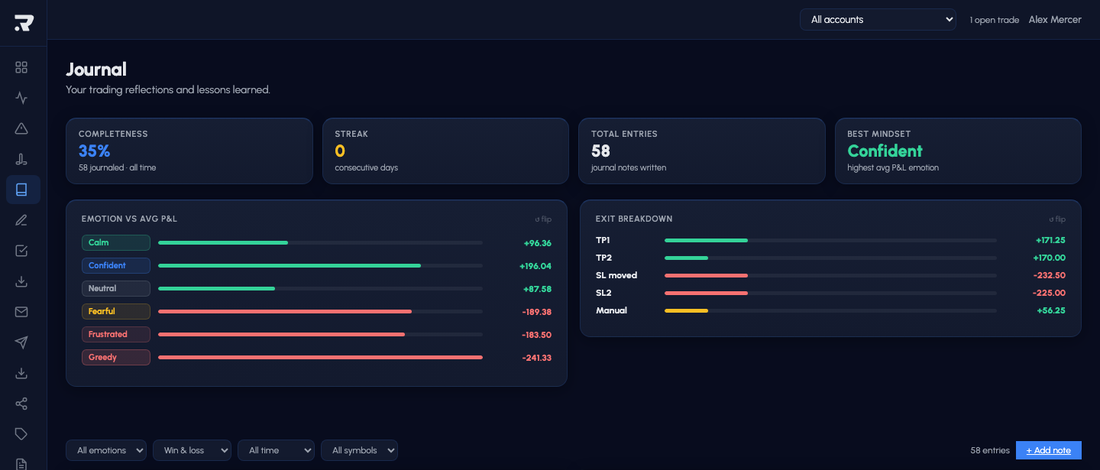
Journal analytics maps your emotional state against profit. See what trading angry actually costs you.
Turn any trading day into a shareable recap video: widescreen, square or story format, rendered for you.
A completeness score and journaling streaks keep the habit alive. Trades without notes stand out instantly.
Tracks your running P&L against the daily loss threshold. Warns near the limit, blocks trades that would breach it.
Calculates drawdown from initial balance or peak equity, static or trailing. Blocks trades if the threshold is at risk.
If a trade would push you past a hard limit, the toolkit blocks the order and shows which rule is being violated.
Not in the pre-loaded list? Edit a JSON config with your firm's exact rules and point the toolkit to it in settings.
Warns or blocks trades within the restricted window around high-impact news. Window size matches your firm's rules.
Tracks active trading days in the current phase and reminds you if you are approaching the deadline short.
Link your Telegram account, subscribe to a provider channel and receive every signal on your MT5 chart within seconds.
Execute a signal with your own risk preset, the toolkit calculates the lot size for your account, not the provider's.
Riskeys never auto-executes. Every signal is a suggestion you accept or skip, one click, your call.
Provider stats are calculated from real linked trades, not screenshots. Win rate and P&L you can trust.
Run your own channel? Publish signals, manage subscribers and track channel performance from Riskeys IQ.
Signals land directly inside MetaTrader 5 where you trade, no extra apps, no copy-paste.
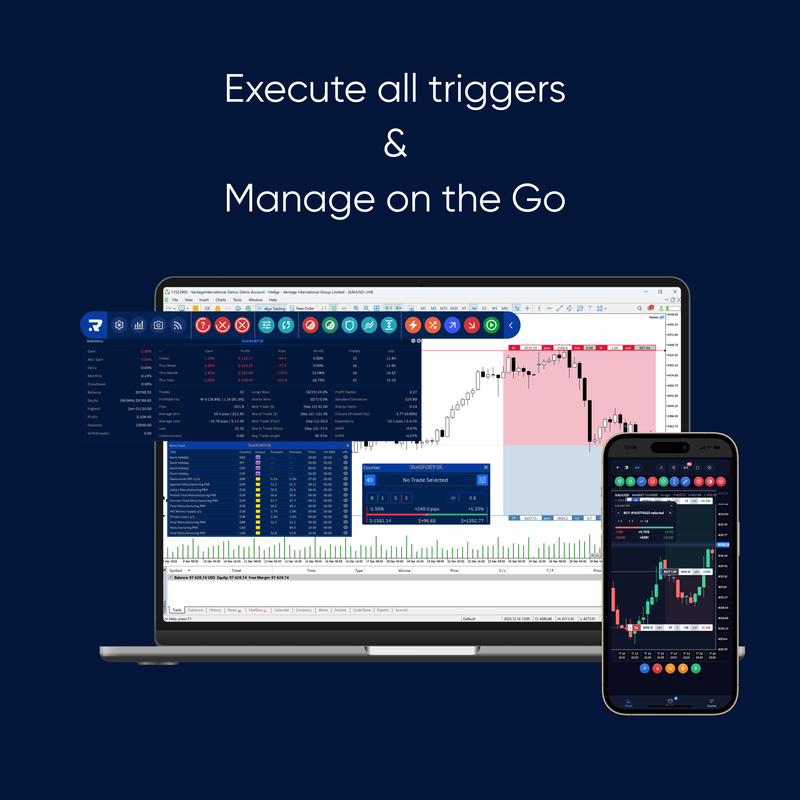
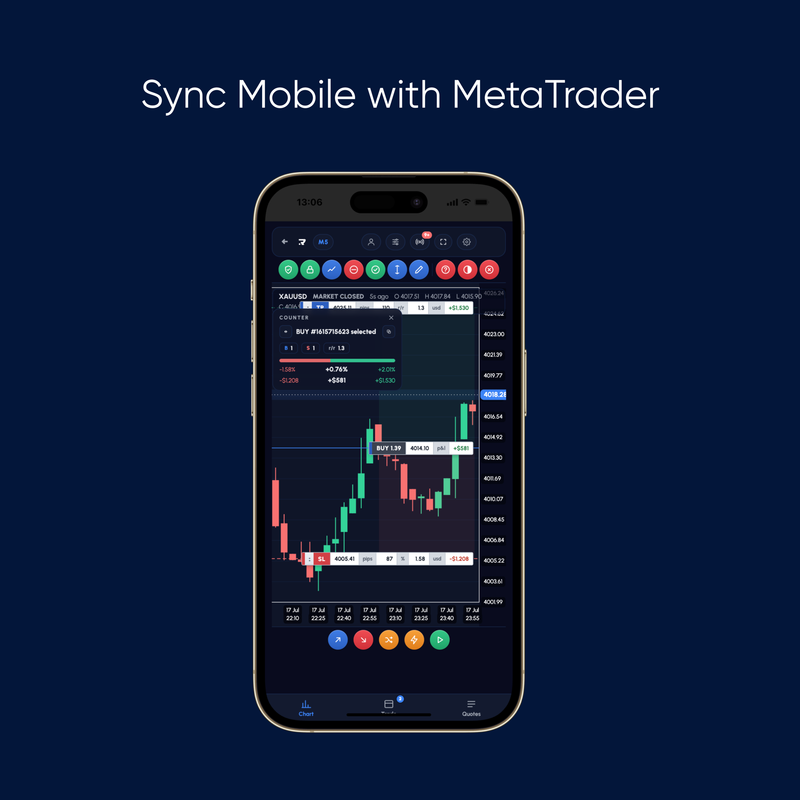
The Riskeys IQ is fully optimized for mobile. Check your stats, review trades and read pattern alerts on the go, no app required.


Buying once lifts the lot cap so you can trade live at size. Subscribing is what opens the full dashboard. Here is every difference in one place.
| Feature | Buy once | Digital Monthly | Core / Elite |
|---|---|---|---|
| Digital on your charts | ✓ | ✓ | ✓ |
| Bluetooth keypad | Only with Keypad | – | ✓ |
| Full dashboard | – | ✓ | ✓ |
| Signals | – | ✓ | ✓ |
| Live lot cap lifted | ✓ | ✓ | ✓ |
| Recurring charge | – | Monthly | Every 6 or 12 months |
Demo accounts are uncapped on every plan, including Free.
Everything you need to know about Riskeys, the RiskTrader Keypad, Riskeys IQ and how to get started.
Riskeys is a risk-management toolkit for MetaTrader traders. RiskTrader installs as a MetaTrader add-on, which is simply how MetaTrader lets a tool live on your chart, but it never trades for you. You place every trade. RiskTrader handles the position sizing, risk limits, fast execution and trade management. You can add the RiskTrader Keypad for one-tap execution, and Riskeys IQ, the cloud-based analytics layer that turns your trades into a journal you can read back.
See how it worksNo. Every trade starts with you pressing a key. Riskeys takes out the calculating and the clicking, not the deciding, and it never opens or closes a position you did not ask for.
Automatic break-even and trailing stops are the one exception, and they only ever follow rules you set yourself.
Yes. The Free tier is permanent and never asks for a card. You get the full Riskeys IQ for your first 14 days, then RiskTrader stays free with Lite IQ. Demo accounts run without limit, and live accounts are capped at 0.03 lot until you buy RiskTrader Digital.
Start freeYes, and only those two today. Supported means the RiskTrader Keypad and RiskTrader itself control real trading and risk functions inside the platform. It does not mean MetaTrader simply sees a USB keyboard.
The Signal Receiver and the Cockpit live view are MT5 only.
A platform joins this list after the integration is built and tested, not before.
You press a key. The keypad sends that command over Bluetooth to RiskTrader on your computer, which reads your risk settings and the trade you selected, then carries out the action in MetaTrader.
That RiskTrader layer is the entire point. A raw keyboard shortcut cannot size a position off your account risk, close half of one specific trade, or move a stop to break-even on the position you highlighted. Those need to know your context.
TradingView is where you fall in love with a setup. Riskeys is where you keep that love from blowing the account.
Charting and execution are two different jobs. TradingView scripts live in a sandbox that cannot place a trade, manage your stop, or enforce a single prop firm rule. Riskeys runs inside MetaTrader, right on your account, so your sizing and risk limits are actually applied. Chart it on TradingView, trade it with Riskeys on MT4 or MT5.
The same answer covers cTrader, NinjaTrader and the rest: no Riskeys integration today. Some platforms will respond to a generic key press, but that is not the same thing, and we do not call it support.
In almost every case, but test it first. Brokers running the same MetaTrader still differ in symbol names, minimum lot sizes, stop distances, execution rules and account permissions. Those differences are precisely what a risk tool touches.
Run Riskeys on a demo account at your broker before going live. Ten minutes there tells you more than any compatibility list.
No. The keypad is optional. RiskTrader Digital works on its own. The RiskTrader Keypad is a hardware add-on for traders who want faster, one-tap execution.
View the keypadThe RiskTrader Keypad is physical hardware that maps your most-used RiskTrader functions to dedicated buttons. It acts as a bridge between your decision and the market, built to reduce execution errors and speed up order entry compared to clicking through your platform.
View the keypadRiskeys IQ turns your trades into a journal with analytics: performance breakdowns, behavioral patterns, your Riskeys Score, trade detail with MAE and MFE, CSV import, a notebook and playbooks. The full feature set is unlocked on the full IQ plans.
Explore IQThe Signal Receiver reads trading signals from Telegram channels you already follow, then parses and structures them inside your Riskeys IQ so you can review them in one place. Riskeys does not provide or send signals, and nothing is executed automatically. You stay in control of every decision. The Signal Receiver is an MT5-only feature.
About the Signal ReceiverIt depends on the option. The physical keypad is a one-time purchase. Some plans are subscriptions that unlock the full IQ, journal and analytics. Toolkit updates become lifetime after the initial period, so you keep the tool even if you stop a plan.
See pricingIt comes down to what you're paying for. The RiskTrader Keypad is hardware, so it's priced once, like buying a device. Riskeys IQ, journal, analytics and Signal Receiver are a live service: they run on servers, need real-time compute to process your trades and signals, and are continuously developed and supported. That ongoing infrastructure, development and customer service is why Riskeys IQ is priced as a term instead of a single upfront fee.
See pricingPricing depends on what you choose: RiskTrader Digital, the RiskTrader Keypad, or a Riskeys IQ plan. See the pricing page for current prices and exactly what each option includes.
See pricingYes. Riskeys can help prop firm traders apply risk rules more consistently. You remain responsible for following each firm's specific terms.
For prop firm tradersIf you are not happy with your order, contact us at support@riskeys.trade and we will guide you through the return process. See the full Refund Policy for details.
Read the refund policy
200+ traders already let Riskeys enforce the rule they used to break under pressure, then show them exactly why last week went the way it did. Start free, no card required.